How-to guide
Fix a past workout
Logged the wrong weight, or forgot a set? Every finished workout can be fixed from the Workout log.
-
Open the workout
On the Progress tab, tap Workout log. Workouts are listed newest first. Tap one to open it.
-
Change or delete a set
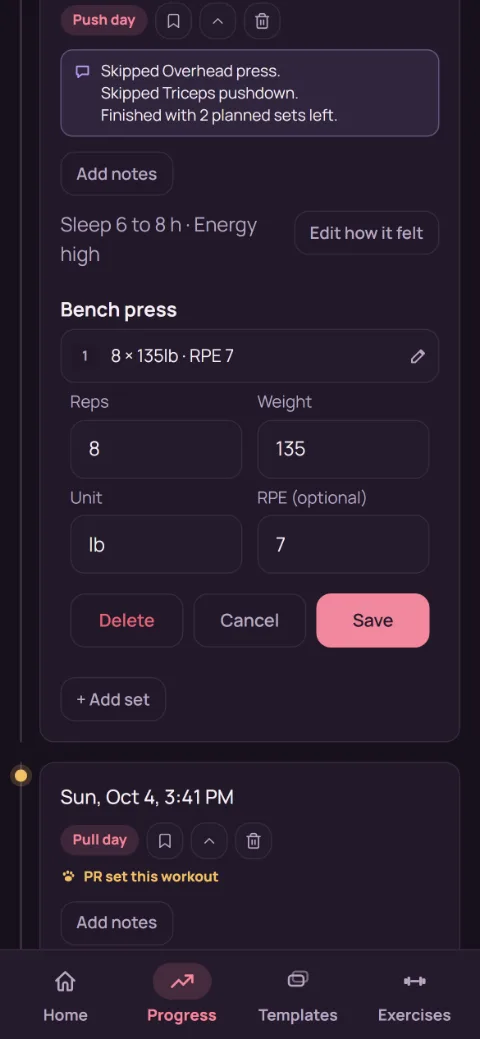
Tap a set to edit it. Change the reps, weight, or RPE and tap Save. To remove it, tap Delete, then Confirm delete.
-
Add a set you forgot
Tap + Add set at the bottom of the workout, pick the exercise, fill in the set, and tap Save.
-
Notes and how it felt
Tap Add notes (or Edit notes) to write down anything worth remembering. Add how it felt sets the workout's sleep, energy, and stress tags (see How did it feel?).
-
Delete the whole workout
Tap the bin at the top of the open workout, then Confirm delete. This can't be undone, so back up first if you're unsure.
-
What updates
Charts, records, Next time targets, and milestones all follow the edited sets, so a typo fixed here stops skewing your progress.
Still stuck?
Email [email protected] and tell us what happened. A screenshot helps.