How-to guide
How did it feel?
Tag how each workout felt in a couple of taps. After 10 tagged workouts, RepBunny shows which ones line up with your best sessions.
-
Tag it on the recap
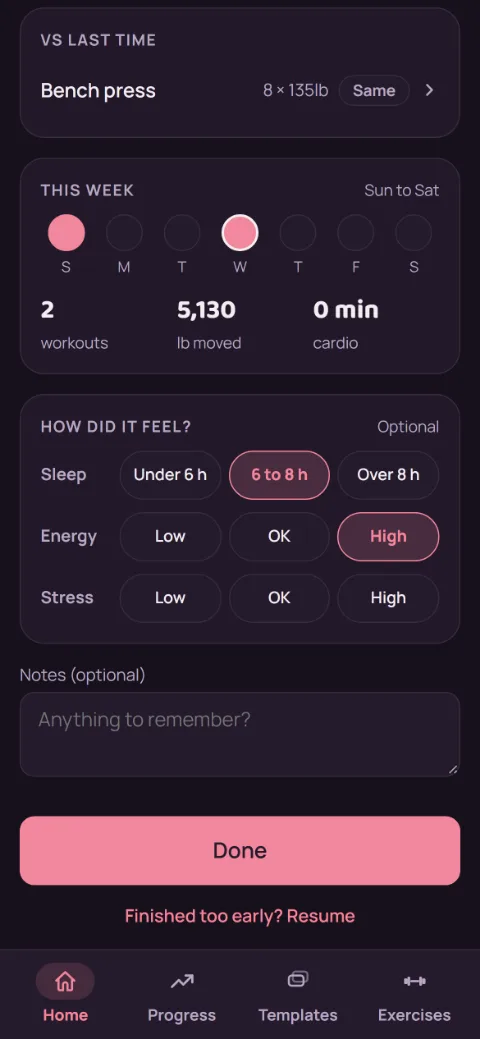
When you finish a workout, the recap has a How did it feel? card. Tap one option per row: Sleep (under 6 h, 6 to 8 h, over 8 h), Energy, and Stress (low, OK, high). All three are optional. Tap a picked option again to clear it.
-
Change it later
Forgot, or picked the wrong one? On the Progress tab, tap Workout log, then the workout. Tap Add how it felt (or Edit how it felt), change the tags, and tap Done. Each tap saves.
-
See what helps you lift
The What helps you lift card shows up on Progress once you've tagged a workout, with how many more you need to reach 10. After that it compares your records and est. 1RM gains across your tags, like "You set 2x more records after over 8 hours of sleep." It's patterns, not proof, and it updates as you tag more.
-
Without Premium
Tagging stays free, and so do the tags in your Workout log. The What helps you lift card is part of Premium: tap Preview to see a sample first.
Still stuck?
Email [email protected] and tell us what happened. A screenshot helps.