How-to guide
Swap a taken machine
Leg press taken? Swap it for something that works the same muscle, just for today. Your template doesn't change.
-
Tap the swap button
During a workout, tap the two arrows next to the exercise name on its card. They show while the exercise still has planned sets left.
-
Pick something close
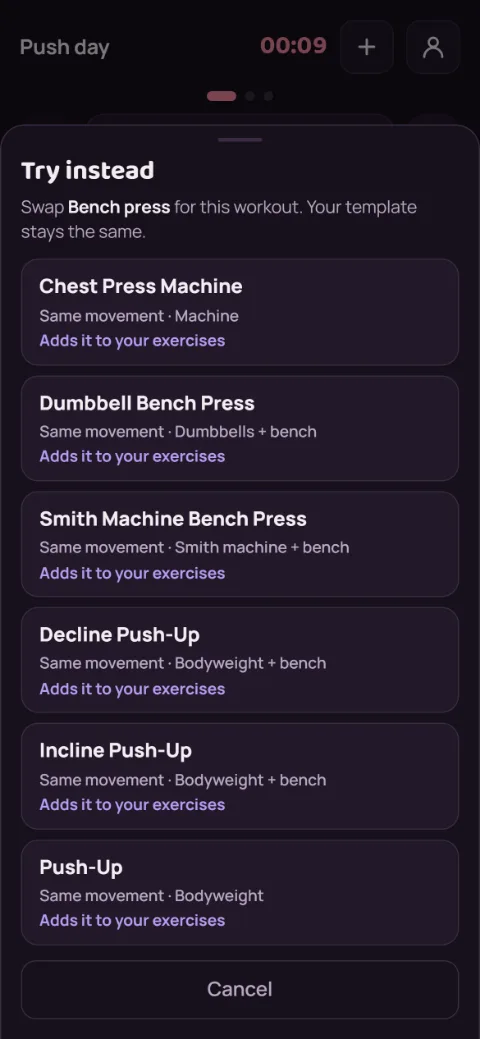
Try instead lists exercises that work the same muscle, triceps for triceps rather than curls. Each one says why it fits, like Same movement, and Last: shows what you lifted on it before. Library exercises you haven't used yet say Adds it to your exercises.
Only a few matches? Tap Show all to see every exercise for that muscle group.
-
Keep going
The new exercise takes the old one's place with the sets you had left and the same rest time. Sets you already logged stay on the old exercise.
-
It lasts for this workout only
Next time, your template starts with the original exercise again. The finish recap and your charts note the swap, so a dip on the old lift makes sense later.
-
Without Premium
Swapping is part of Premium. You can still open Try instead and see the matches. Picking one shows Keep it with Premium, or Go back to carry on as planned.
Still stuck?
Email [email protected] and tell us what happened. A screenshot helps.