How-to guide
Next-set targets
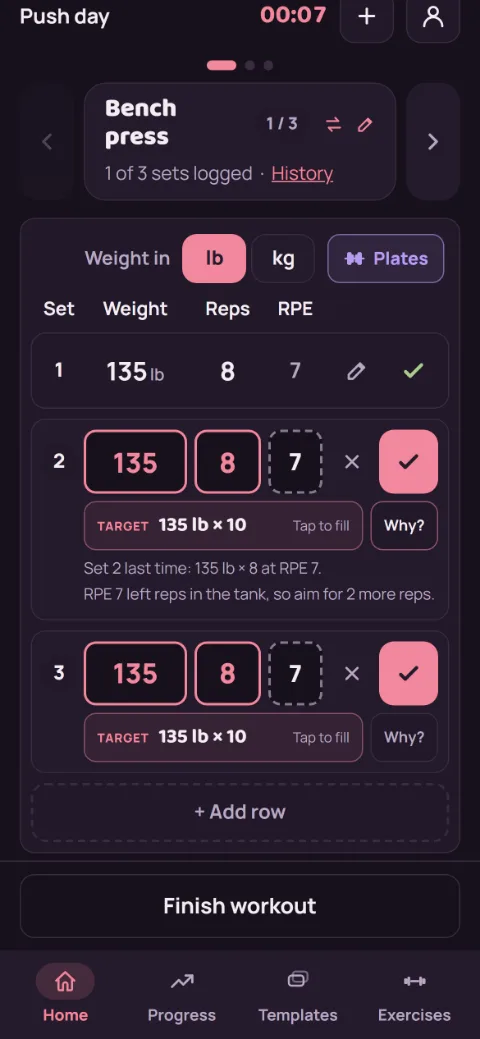
While you log, each open set gets its own target: the weight and reps to aim for. It's worked out from the same set in your last session and how hard it felt, and it always shows its math. Targets are part of Premium.
-
Log an RPE
After a set, type how hard it felt in the RPE box (10 means nothing left, 8 means two reps left). Next time, targets read the RPE of each set you logged. No RPE is fine too: you get the usual step of one more rep, or more weight once you hit 12.
-
Read the targets
Start a workout and pick a weight or machine-level exercise. Each open row shows a Target under its boxes, for example 135 lb × 10. Set 1 works from your best set last time, and each set after it from the same set last time. RPE 7 or under adds two reps or jumps two weight steps. RPE 7.5 to 9 is the usual step. RPE 9.5 or 10 keeps the weight and asks for one more rep, until you reach 12 reps. Then it goes up like usual. Tap Why? on a row to see last time, the rule it used, and for set 1 your est. 1RM.
-
Tap to fill a row
Tap a row's target to put its weight and reps in that row. Nothing changes until you tap: rows still start from last time, and sets you've logged stay as they are. Logging today's sets doesn't move the other targets, so a plan like 170, 160, 150 keeps its own numbers for each set.
-
When you stall
Miss the target two sessions in a row and it holds the weight: Same weight, try for one more rep. Miss it three times, or let the lift go flat, and it offers a Lighter week? above your sets, before your first set: about 10% off for one session. Tap Take it and the target drops for that session, then goes back to where you were the time after. Tap Not now to keep going as you are. The exercise's history screen offers it too.
-
Warm up to it
On a barbell or dumbbell lift, tap Warm-up above your sets before your first set. It lists a few lighter sets that build up to your target, like the empty bar for 10, then about 40%, 60%, and 80% of it, rounded to weights you can load. On a barbell, tap a line to open the plate calculator at that weight. Warm-ups are a guide only: they aren't logged and don't count toward records or volume.
-
Start a new lift
The first time you log a weight lift, a Starting weight card says what to try and where it came from. If you've logged a similar lift (same muscle group and equipment), it starts from that one, on the light side. If you're brand new and have a weigh-in, it can give a rough start from your body weight, asking once whether to use the male or female strength table. Otherwise it suggests a test set: a weight you could do about 12 times. Tap the card to fill set 1. After your first set, your own sets take over.
-
Turn it off for one exercise
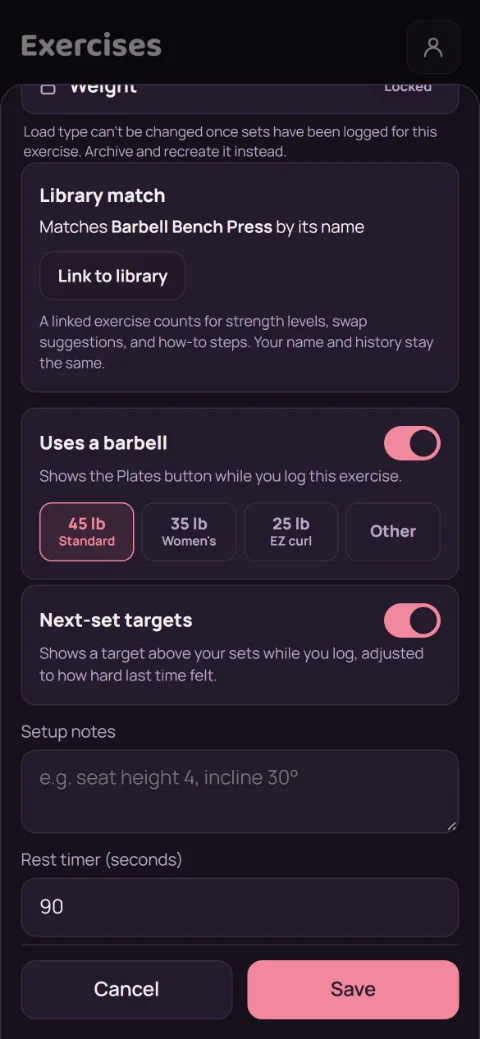
Go to Exercises, tap the pencil on the exercise, switch off Next-set targets, and tap Save. That also hides its warm-up and starting weight. The exercise's history screen then shows the plain Next time card again.
Still stuck?
Email [email protected] and tell us what happened. A screenshot helps.