How-to guide
Milestones
Your training unlocks milestones as you go. There's nothing to keep up and nothing to lose: a missed week never takes one away.
-
See how close you are
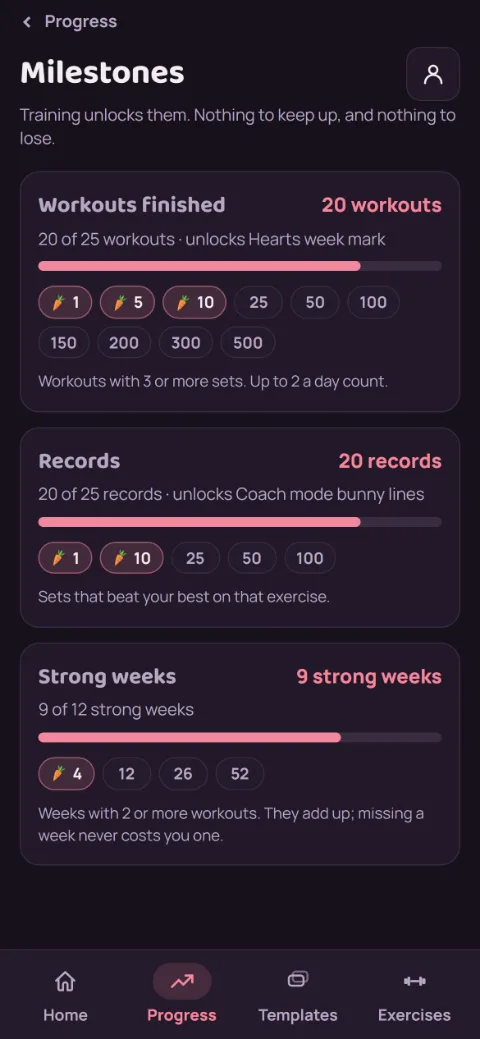
On the Progress tab, tap Milestones. Each track shows your count, a bar to the next milestone, what it unlocks, and every milestone as a chip.
-
Know what counts
Workouts finished counts workouts with 3 or more sets, up to 2 a day. Records counts sets that beat your best on that exercise (timed sets don't count). Strong weeks counts weeks, Sunday to Saturday, with 2 or more workouts. They add up; they don't have to be in a row.
-
Unlock one
When a workout crosses a milestone, the finish recap shows it. With Premium, many milestones unlock an Extra, like a new week mark or rest chime. A screen right after you finish shows what you got and lets you see or hear it: tap Use it now to put it on, or Not now to pick it later under Theme, then Extras (see Extras). Without Premium, some milestones earn a trial pass instead (below), and the rest are achievements. When your next reward is close (3 workouts or records away, or 1 strong week), the recap names it and how close you are.
Rather not see them, or the next-reward line, on the recap? Turn off Milestone moments under Account, then Preferences. Milestones still count and stay on the Milestones screen, and turning it back on won't replay the ones you passed.
-
Use a trial pass
Without Premium, 10, 50, and 150 workouts and 12 strong weeks each earn a trial pass. Tap Pick a Premium feature to try on the recap, or Pick a feature to try on the Milestones screen, then pick one: themes, lift progress, next-set targets, monthly reports, strength levels, the plate calculator, or swap suggestions.
It works exactly like Premium for 7 days. One runs at a time, and extra passes wait until it ends. What you set up during a trial is kept and comes back if you unlock Premium.
Still stuck?
Email [email protected] and tell us what happened. A screenshot helps.